
PI Notifications & Multi-Channel Alerting Guide (Email, SMS, Mobile Push & Escalation Teams)
This guide provides a comprehensive architectural analysis of how the AVEVA PI System (PI Notifications Service, PI Asset Framework Notification Rules, PI Vision, and industrial alarm add-ons such as Exele TopView) delivers real-time operational alerts across Email, SMS, Mobile Push, and Enterprise ChatOps, followed by the complete implementation reference and step-by-step hardware/software setup in GxPHistorian.
1. Deep Research: How AVEVA PI System Provides Alerts (Email, SMS, Mobile Push)
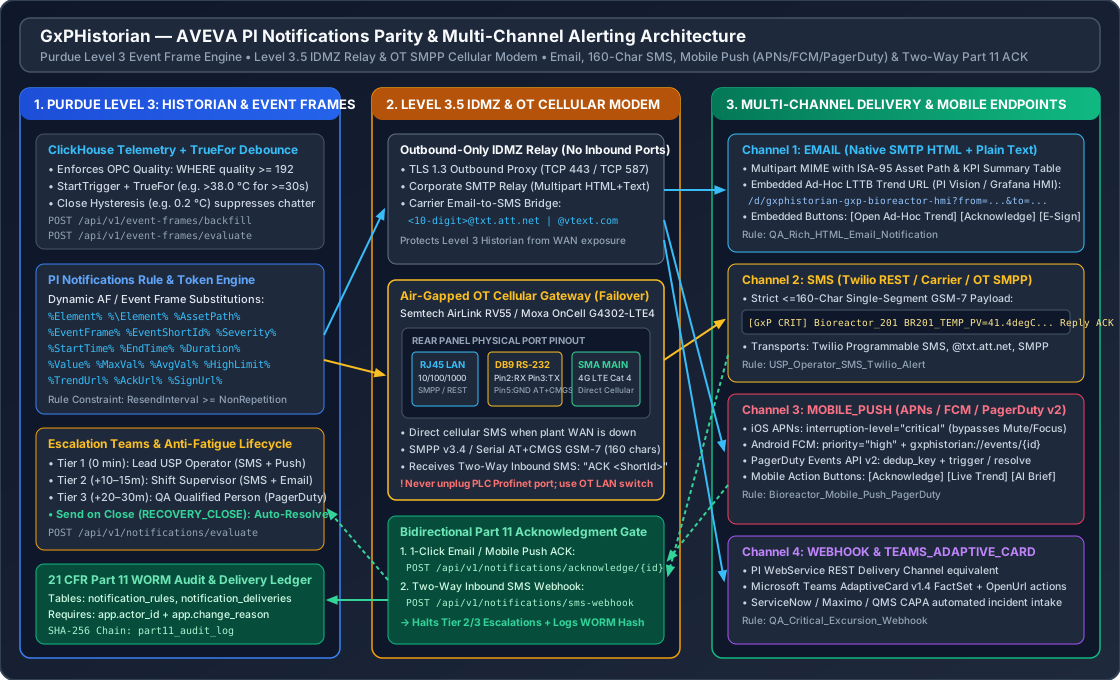
In modern AVEVA PI System deployments (since PI AF 2016 R2+, when legacy standalone PI Notifications 1.x was unified into PI AF Notification Rules), alerting is tightly coupled to ISA-88 Event Frames and PI Analysis Service:
- Event Frame Generation &
TrueForDebounce:- Rather than firing raw point-level threshold alarms that chatter on noisy signals, AVEVA PI Server / PI Asset Framework evaluates a Start Trigger expression (e.g.,
'Vessel_Temperature' > 38.0) with aTrueForduration debounce (e.g.,30 seconds) and a Close Hysteresis deadband. - Only when the excursion persists continuously for does the engine open an Event Frame and trigger the PI Notifications Service.
- Rather than firing raw point-level threshold alarms that chatter on noisy signals, AVEVA PI Server / PI Asset Framework evaluates a Start Trigger expression (e.g.,
- Dynamic Context & Substitution Parameters (
%Element%,%EventFrame%,%StartTime%):- Notification message templates dynamically resolve AF Element and Event Frame attributes at dispatch time using percent-delimited tokens:
%Element%(the primary AF Element name, e.g.,Bioreactor_201),%\Element%(root enterprise node),%..\Element%(immediate parent unit).%EventFrame%(event name),%StartTime%,%EndTime%,%Duration%,%Severity%, and captured attribute values (%Value%,%MaxVal%,%AvgVal%,%EngUnits%,%HighLimit%).
- Notification message templates dynamically resolve AF Element and Event Frame attributes at dispatch time using percent-delimited tokens:
- The Four Delivery Channels in Enterprise PI Deployments:
- Channel 1 — Native SMTP Email (
EMAIL):- Out of the box, PI Notifications includes a native Email Delivery Channel (
multipart/alternativeHTML + Plain Text). - Emails embed dynamic hyperlinks back to AVEVA PI Vision (Ad-Hoc Trend Links passing asset/tag context and
StartTime/EndTimeURL parameters) plus an Acknowledge Hyperlink that lets an operator or QA reviewer acknowledge the Event Frame directly from their inbox.
- Out of the box, PI Notifications includes a native Email Delivery Channel (
- Channel 2 — Cellular SMS Text Messaging (
SMS):- Native PI Notifications does not include an embedded cellular modem driver; instead, plants implement SMS via three industry-standard pathways:
- Cloud REST SMS Gateways (Twilio Programmable SMS): Triggered via the PI Notifications WebService (REST) Delivery Channel from an outbound-only Purdue Level 3.5 IDMZ relay.
- Carrier Email-to-SMS Gateways: Routing compact -character GSM-7 messages through corporate SMTP to
<10-digit-number>@txt.att.net,@vtext.com, or@tmomail.net. - Air-Gapped OT Hardware Cellular Modems & Exele TopView for PI: Critical GMP facilities use industrial LTE gateways (Semtech / Sierra Wireless AirLink RV55 or Moxa OnCell G4302-LTE4 Series) over local Ethernet (
SMPP v3.4) or serialRS-232(AT+CMGS) so SMS alerts and Two-Way SMS Acknowledgments (Reply ACK <ID>) continue working even if the corporate WAN/internet connection fails.
- Native PI Notifications does not include an embedded cellular modem driver; instead, plants implement SMS via three industry-standard pathways:
- Channel 3 — Mobile Push & On-Call Incident Management (
MOBILE_PUSH):- Routes high-priority JSON payloads to PagerDuty Events API v2 (
trigger/acknowledge/resolvewithdedup_key), Apple Push Notification service (APNs) withinterruption-level: "critical"(which bypasses iOS Mute / Focus mode for GMP critical alarms), and Android Firebase Cloud Messaging (FCM) (priority: "high") with mobile deep-links (gxphistorian://events/{event_id}).
- Routes high-priority JSON payloads to PagerDuty Events API v2 (
- Channel 4 — WebService REST & Microsoft Teams Adaptive Cards (
WEBHOOK/TEAMS_ADAPTIVE_CARD):- Posts structured JSON or Microsoft Teams
AdaptiveCardv1.4 payloads withFactSettables andAction.OpenUrlbuttons into control-room ChatOps channels or QMS/CAPA systems (ServiceNow, Veeva Vault QMS, IBM Maximo).
- Posts structured JSON or Microsoft Teams
- Channel 1 — Native SMTP Email (
- Anti-Fatigue Timing Controls, Escalation Teams & “Send on Close”:
- Non-Repetition Interval (
non_repetition_minutes): Enforces a quiet window after an alert fires so chattering sensors hovering near a limit do not flood operators with duplicate Event Frame emails/SMS. - Resend Interval (
resend_interval_minutes): Periodically repeats the alert while the Event Frame remains unacknowledged. PI Invariant: When both intervals are enabled,resend_interval_minutesmust benon_repetition_minutes. - Escalation Teams (
escalation_team): Ordered multi-tier contact roster (e.g., Tier 1: Lead USP Operator at Tier 2: Shift Supervisor at Tier 3: QA Qualified Person at ). - Event Frame Acknowledgment: When an operator acknowledges the Event Frame (via 1-click email/mobile link or Two-Way SMS
"ACK <EventShortId>"), PI Notifications immediately halts further resends and escalation tiers while recording a 21 CFR Part 11 audit trail entry. - Send on Close (
notify_on_close/RECOVERY_CLOSE): When the process condition returns to normal and the Event Frame closes (end_time IS NOT NULL), the engine dispatches an[ALL CLEAR / RECOVERY_CLOSE]summary with the finalized%EndTime%,%Duration%, and PagerDutyevent_action: "resolve".
- Non-Repetition Interval (
2. Non-Technical Hardware & Network Setup Walkthrough (OT Cellular SMS & IDMZ Relay)
For GMP manufacturing suites where critical excursion alerts (such as ULT -80 °C Freezer Failures or Bioreactor Thermal Excursions) must reach on-call personnel even during an IT network outage, follow this step-by-step physical setup:
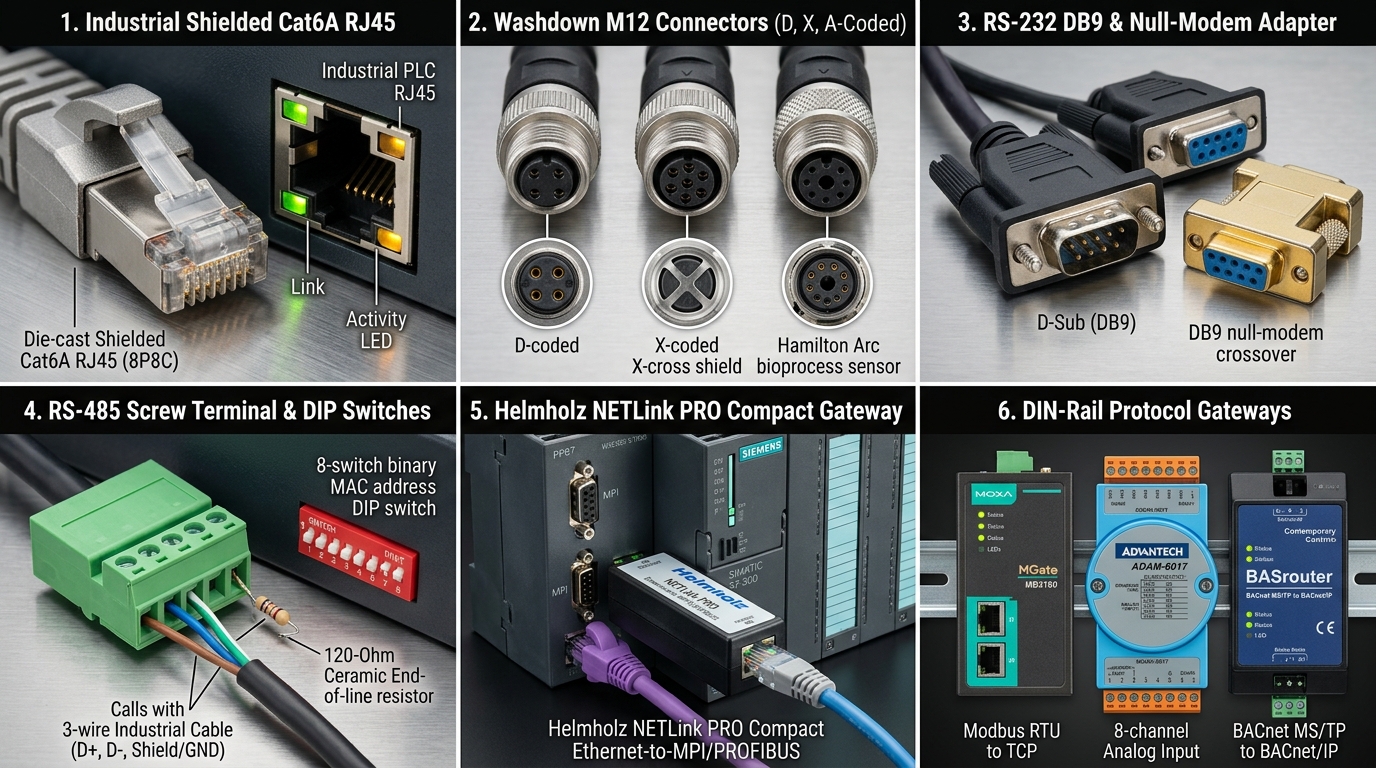
Step 1: What Hardware & Cables to Buy
| Component Role | Recommended Industrial Model | Official Manufacturer Product Page | Cable / Connector Required |
|---|---|---|---|
| Compact OT LTE Cellular Gateway (SMPP / REST / Serial SMS) | Semtech (Sierra Wireless) AirLink RV55 Rugged LTE-A Pro Router | AirLink RV55 Official Page | Shielded Cat6 RJ45 Ethernet patch cord + DB9 Female-to-Female null-modem serial cable + Dual SMA 4G LTE cellular antennas |
| DIN-Rail Industrial Cellular Router (Dual-SIM Failover) | Moxa OnCell G4302-LTE4 Series Industrial Secure Cellular Router | Moxa OnCell G4302-LTE4 Official Page | DIN-rail 24 VDC power supply + Shielded Cat6 RJ45 cable to Level 3.5 IDMZ switch |
| Cloud Programmable SMS & Voice Carrier API | Twilio Programmable Messaging (SMS) | Twilio SMS Official Page | Outbound HTTPS (TCP 443) from Level 3.5 IDMZ to api.twilio.com |
| On-Call Incident & Mobile Push Escalation Platform | PagerDuty Events API v2 | PagerDuty Events API v2 Docs | Outbound HTTPS (TCP 443) from Level 3.5 IDMZ to events.pagerduty.com |
Step 2: Physical Ports to Plug Into (And What NEVER to Unplug)
- Insert Activated M2M SIM Card: Insert a standard industrial M2M cellular SIM card (AT&T FirstNet, Verizon, or T-Mobile with SMS enabled) into SIM Slot 1 on the AirLink RV55 or Moxa OnCell G4302-LTE4, and thread the cellular antenna onto the
SMA MAINconnector. - Connect the Ethernet Port (
RJ45 LAN): Run a shieldedCat6 RJ45cable from the cellular gateway’sLAN(RJ45) port to your Purdue Level 3.5 IDMZ switch (e.g.,192.168.35.10/24). - Optional Serial
RS-232Air-Gapped Link (DB9): If firewall policy prohibits IP routing to the cellular modem, connect aDB9serial cable (Pin 2 RX,Pin 3 TX,Pin 5 GND) from thehistorian-apihost to the gateway’sRS-232(DB9) port for directAT+CMGSGSM-7 SMS transmission. - CRITICAL SAFETY RULE: NEVER unplug the
PROFINET(X1 P1/P2),EtherNet/IP, or safety interlock cables on the bioreactor or cleanroom PLC cabinet to plug in an alerting gateway. Always connect alerting relays to the dedicated Level 3 / Level 3.5 Historian Switch.
3. GxPHistorian Multi-Channel Alerting REST API Reference
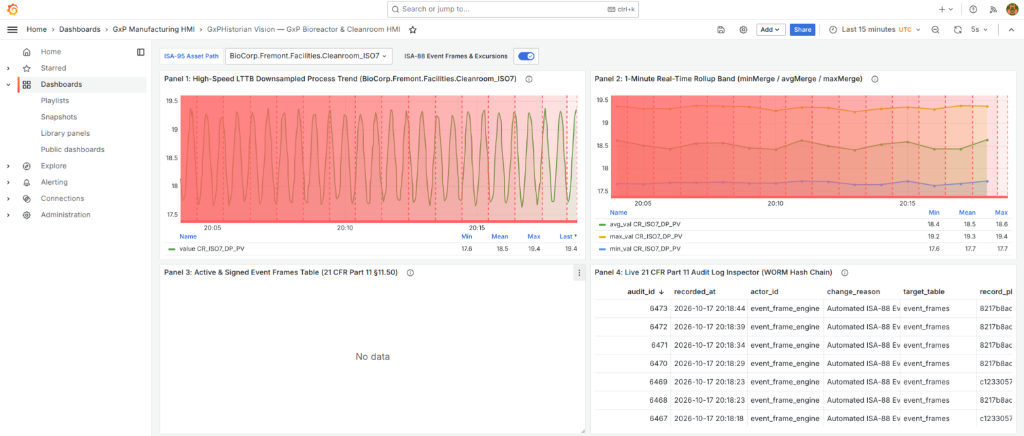
GxPHistorian implements full AVEVA PI Notifications parity inside app/pi_parity_engine.py, backed by two 21 CFR Part 11 WORM-audited PostgreSQL tables (notification_rules and notification_deliveries).
3.1 Supported Delivery Channels & Substitution Tokens (GET /api/v1/notifications/channels)
Query the built-in delivery channel catalog, supported %Parameter% tokens, and anti-fatigue rules:
curl -s http://localhost:8000/api/v1/notifications/channels | jq .3.2 Supported PI Substitution Parameters
| Token | Resolved Value | Example Output |
|---|---|---|
%Element% | ISA-95 Asset / AF Element Name | Bioreactor_201 |
%\Element% | Root Enterprise Element | BioCorp |
%..\Element% | Immediate Parent Unit / Area | USP |
%AssetPath% | Full PostgreSQL ltree Asset Path | BioCorp.Fremont.USP.Bioreactor_201 |
%EventFrame% | ISA-88 Event Frame Name | BR201_TEMP_PV_Temp_Excursion_TrueFor_30s |
%EventId% | Full Event Frame UUID | a1b2c3d4-0000-4000-8000-000000000001 |
%EventShortId% | 8-Character Short Code for SMS ACK | A1B2C3D4 |
%Severity% | Event Severity (CRITICAL, WARNING, INFO) | CRITICAL |
%Phase% | Lifecycle Phase (TRIGGER, ESCALATION, RECOVERY_CLOSE) | TRIGGER |
%StartTime% | Event Frame UTC Start Timestamp | 2026-01-16T18:05:00Z |
%EndTime% | Event Frame UTC End Timestamp or ACTIVE (OPEN) | 2026-01-16T18:07:30Z |
%Duration% | Formatted Event Frame Duration | 2.5m |
%Tag% | Triggering Historian Tag Name | BR201_TEMP_PV |
%Value% / %MaxVal% / %AvgVal% | Latest, Peak, and Mean Good-Quality (quality >= 192) Values | 41.4 / 41.4 / 40.7667 |
%EngUnits% / %HighLimit% | Engineering Units & Alarm Limit | degC / 38.0 |
%TrendUrl% | Deep-Link to Grafana Vision LTTB Ad-Hoc Trend | http://localhost:3000/d/gxphistorian-gxp-bioreactor-hmi?... |
%AckUrl% | 1-Click 21 CFR Part 11 Event Frame Acknowledge URL | http://localhost:8000/api/v1/notifications/acknowledge/... |
%SignUrl% | 21 CFR §11.200 Electronic Signature Execution URL | http://localhost:8000/api/v1/event-frames/.../sign |
3.3 Configure a Multi-Tier PI Notification Rule (POST /api/v1/notifications/rules)
Creating or modifying a notification rule requires 21 CFR Part 11 X-Actor-Id and X-Change-Reason headers and enforces the PI Notifications invariant that resend_interval_minutes >= non_repetition_minutes:
curl -s -X POST http://localhost:8000/api/v1/notifications/rules \ -H "Content-Type: application/json" \ -H "X-Actor-Id: qa_approver_01" \ -H "X-Change-Reason: Configure Multi-Tier SMS and Mobile Push Escalation for USP Bioreactor" \ -d '{ "rule_name": "USP_Bioreactor_Thermal_SMS_And_Push", "event_template_filter": "Temp_Excursion_TrueFor_30s", "min_severity": "CRITICAL", "channel_type": "SMS", "target_endpoint": "+14155550101", "escalation_minutes": 10, "non_repetition_minutes": 5, "resend_interval_minutes": 15, "notify_on_close": true, "message_template": "[GxP %Severity%] %Element% (%EventFrame%): %Value% %EngUnits% (Lim:%HighLimit%) @ %StartTime%. Reply ACK %EventShortId%", "escalation_team": [ { "tier": 1, "role": "Lead USP Operator", "contact_name": "Sarah Jenkins", "channel_type": "SMS", "target_endpoint": "+14155550101", "delay_minutes": 0 }, { "tier": 2, "role": "USP Shift Supervisor", "contact_name": "David Chen", "channel_type": "MOBILE_PUSH", "target_endpoint": "fcm://device-usp-supervisor-02", "delay_minutes": 10 }, { "tier": 3, "role": "QA Qualified Person", "contact_name": "Dr. Marcus Vance", "channel_type": "EMAIL", "target_endpoint": "marcus.vance@biocorp.internal", "delay_minutes": 20 } ], "delivery_config": { "gateway_provider": "TWILIO_REST_API", "fallback_gateway": "OT_SMPP_CELLULAR_MODEM", "two_way_ack_enabled": true } }' | jq .3.4 Preview Multi-Channel Payloads (POST /api/v1/notifications/preview)
Test and inspect the exact rendered payloads for Email (HTML + Plain Text), SMS (160-character single-segment GSM-7), Mobile Push (Apple APNs Critical Alert + Android FCM + PagerDuty Events v2), and Microsoft Teams Adaptive Cards:
curl -s -X POST http://localhost:8000/api/v1/notifications/preview \ -H "Content-Type: application/json" \ -d '{ "notification_phase": "TRIGGER", "recipient_email": "qa-compliance@biocorp.internal", "recipient_phone_e164": "+14155550101", "recipient_mobile_uri": "fcm://device-usp-operator-01" }' | jq .3.5 Evaluate Notifications, Escalation Teams & Two-Way SMS Acknowledgment
- Dispatch Initial
TRIGGERAlerts Across All Active Channels (WEBHOOK,SMS,MOBILE_PUSH,EMAIL):Terminal window curl -s -X POST "http://localhost:8000/api/v1/notifications/evaluate" | jq . - Acknowledge via Two-Way Inbound SMS (
POST /api/v1/notifications/sms-webhook): When an operator repliesACK <EventShortId> <notes>from their mobile phone (via Twilio Webhook or OT SMPP Cellular Modem),GxPHistorianmaps the phone number to the operator identity, records a 21 CFR Part 11 WORM audit entry, and halts all Tier 2 / Tier 3 escalations:Terminal window curl -s -X POST http://localhost:8000/api/v1/notifications/sms-webhook \-H "Content-Type: application/json" \-d '{"from_phone": "+14155550101","message_body": "ACK LATEST Checked bioreactor cooling jacket valve on floor","gateway_provider": "TWILIO_SMS_WEBHOOK"}' | jq . - Or Acknowledge via 1-Click Mobile / Email Endpoint (
POST /api/v1/notifications/acknowledge/{event_id}):Terminal window curl -s -X POST "http://localhost:8000/api/v1/notifications/acknowledge/${EVENT_ID}" \-H "Content-Type: application/json" \-H "X-Actor-Id: operator_01" \-H "X-Change-Reason: Acknowledged alert from mobile push notification" \-d '{"ack_channel": "MOBILE_PUSH", "ack_comment": "Inspecting jacket PID loop"}' | jq . - Dispatch “Send on Close” Recovery Summary (
dispatch_recovery_on_close=true):Terminal window curl -s -X POST "http://localhost:8000/api/v1/notifications/evaluate?dispatch_recovery_on_close=true" | jq .