
Upstream Bioreactors & Parallel Microbioreactors Integration Guide
Connecting Sartorius Biostat® STR, Sartorius Ambr® 15/250, Thermo Fisher HyPerforma™ (TruBio® DV), and Eppendorf BioFlo® / DASGIP® Systems to GxPHistorian GxP Industrial Historian
For Cytiva Xcellerex™ X-Platform bioreactors, see the dedicated guide: XCELLEREX_X_PLATFORM_INTEGRATION.md.
1. Overview of Upstream Bioreactor Platforms
Upstream Processing (USP) seed trains, Process Development (PD) high-throughput screening, and GMP production vessels rely on four dominant bioreactor automation ecosystems alongside Cytiva Figurate™:
- Sartorius Biostat STR® (Gen 3) & Biostat® B-DCU: Controlled by local Biobrain / DCU-4 (Siemens SIMATIC S7-1500 PLC) and supervised by BioPAT® MFCS 4 SCADA, exposing native OPC UA and Siemens S7comm interfaces.
- Sartorius Ambr® 250 High Throughput & Ambr® 15 Cell Culture: Automated parallel microbioreactor workstations (12, 24, or 48 single-use vessels) exposing a unified Ambr® OPC UA Server (or bridged via BioPAT® MFCS) with multi-vessel namespace trees.
- Thermo Fisher Scientific HyPerforma™ S.U.B. / S.U.F. (50 L – 5000 L): Powered by TruBio™ DV software built natively on Emerson DeltaV™ DCS, exposing OPC UA (DeltaV PK / Application Station) and legacy OPC DA.
- Eppendorf BioFlo® 320 / 720 & DASGIP® Parallel Bioreactors: Equipped with DASware® connect, which provides an integrated OPC UA and OPC DA server for seamless historian and DoE integration.
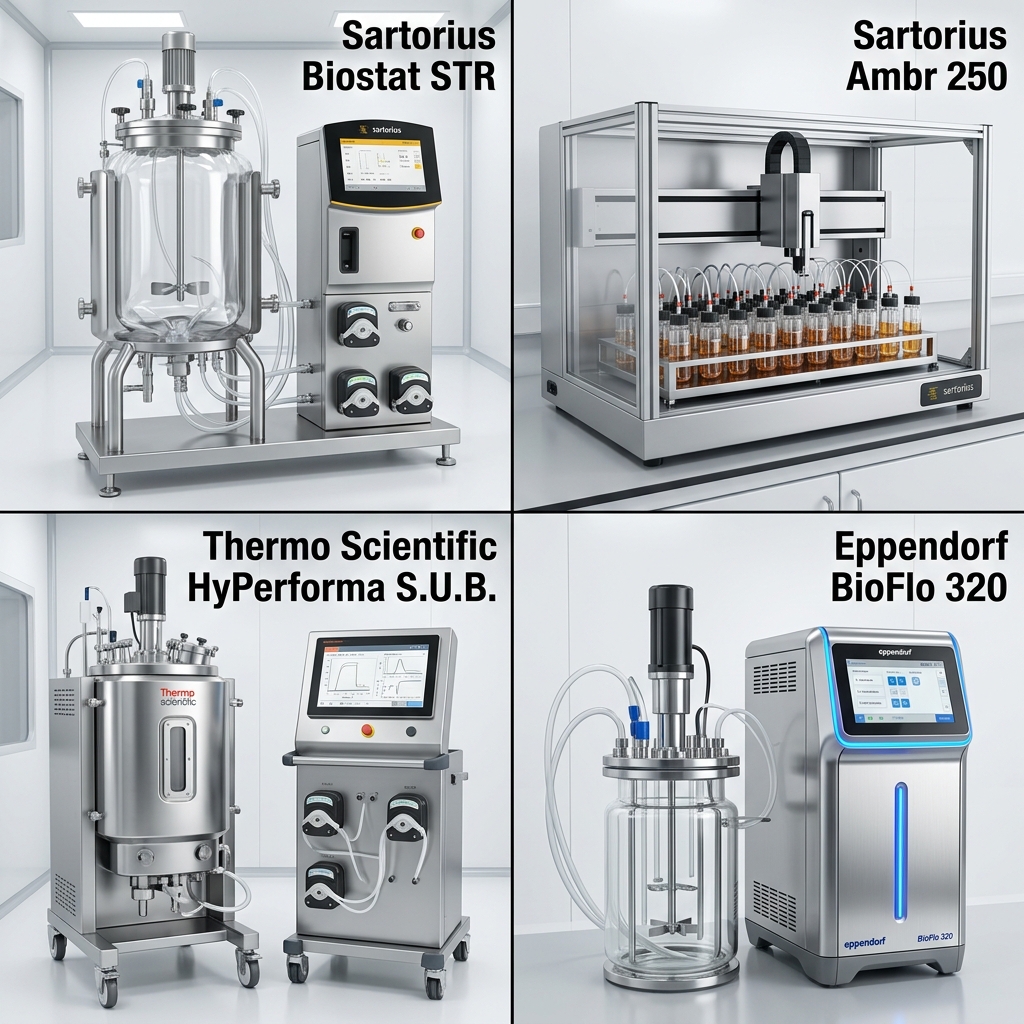
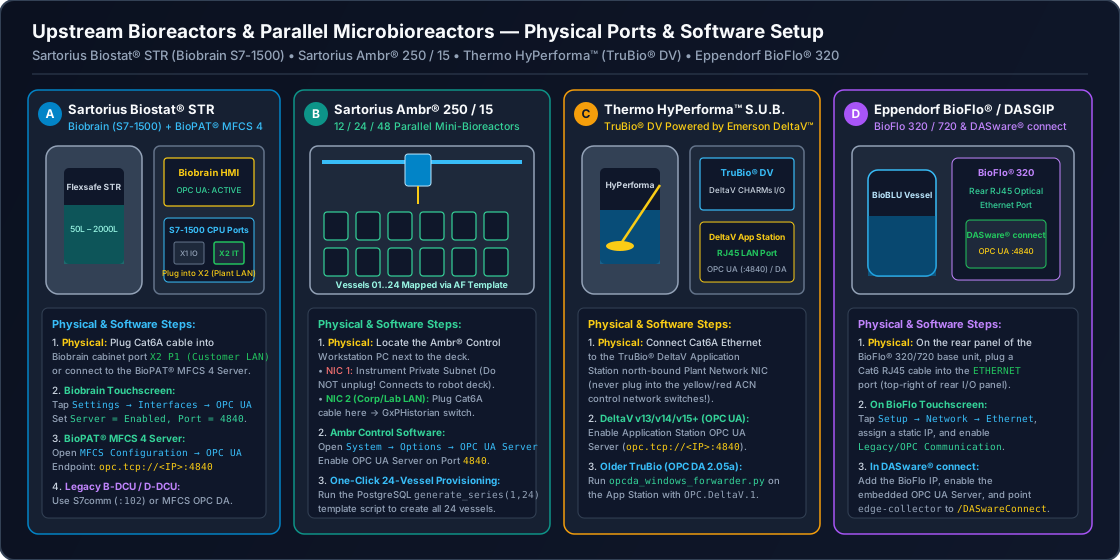
1.5 Non-Technical Step-by-Step Physical & Software Connection Walkthrough
Whether you are connecting a benchtop Eppendorf BioFlo 320, a 24-vessel Sartorius Ambr 250 robot, or a 2,000 L Sartorius Biostat STR, here is exactly where to plug in and which menu buttons to press:
| Bioreactor System | Where to Plug the Ethernet Cable on the Physical Unit | Exact Touchscreen / Software Menu Path to Enable | Network Test Command |
|---|---|---|---|
| 1. Sartorius Biostat STR® (Gen 3) & Biostat® B-DCU | Open the stainless Biobrain / DCU-4 cabinet door. Locate the Siemens S7-1500 CPU. Plug a Cat6A cable into Port X2 (Plant / SCADA LAN)—leave Port X1 (Green PROFINET I/O cable) untouched! | Path A (Direct Biobrain OPC UA): On the Biobrain touchscreen, tap Settings Service Network (X2), set Static IP 10.20.40.15, and verify OPC UA Server = Active (:4840).Path B (Via BioPAT® MFCS 4 PC): Open MFCS 4 Configurator OPC UA Server Enable Server on Port 4840. | nc -zv 10.20.40.15 4840 |
| 2. Sartorius Ambr® 250 & Ambr® 15 (12/24/48 Vessels) | Look at the back of the Ambr Control Workstation PC next to the liquid-handling deck. NEVER unplug NIC 1 (connected to the Ambr robot & deck sensors). Plug your Cat6 cable into NIC 2 (Plant Network) (or plug in a USB 3.0 Gigabit Ethernet adapter). | Open Ambr® Runtime Software System Configuration OPC UA Server. Check Enable OPC UA Server, bind it to NIC 2 IP (10.20.40.20:4840), and verify all 12/24/48 vessel namespaces (Vessel_01 .. Vessel_24) are exported. | nc -zv 10.20.40.20 4840 |
| 3. Thermo Fisher HyPerforma™ S.U.B. / S.U.F. (TruBio™ DV) | Locate the TruBio® DV / Emerson DeltaV™ Control Tower on the bioreactor skid. Plug a Cat6A cable into the bulkhead port labeled NORTHBOUND / HISTORIAN LAN (SCN2). | On the TruBio® DV / DeltaV Application Station, open DeltaV Explorer Application Station Properties OPC UA Server, check Enable (:4840), and trust the GxPHistorian client certificate. | nc -zv 10.20.40.30 4840 |
| 4. Eppendorf BioFlo® 320 / 720 & DASGIP® Parallel | Look at the lower-rear connector panel of the BioFlo 320 cylindrical control tower (above the gas sparge connections). Plug a Cat6 cable into the upper RJ45 jack labeled Ethernet / OPC (do not use the lower Aux / Sensor Bus port). | On the BioFlo 320 front touchscreen, tap Settings (Gear) System Network, enter Static IP 10.20.40.40. Then tap Settings License / Features OPC UA and toggle OPC UA Server = ON (Port 4840) (requires Eppendorf DASware connect / OPC UA license key). | nc -zv 10.20.40.40 4840 |
2. Integration Architecture
flowchart LR
  subgraph USP["Upstream Bioreactor Skids & Workstations"]
    SART["Sartorius Biostat® STR Gen 3\n(Biobrain S7-1500 / BioPAT® MFCS 4)"]
    AMBR["Sartorius Ambr® 250 / Ambr® 15\n(12–48 Parallel Vessels OPC UA)"]
    TRUBIO["Thermo Fisher HyPerforma™ S.U.B.\n(TruBio® DV / Emerson DeltaV™)"]
    EPP["Eppendorf BioFlo® / DASGIP®\n(DASware® connect)"]
  end

  subgraph Edge["Pillar 1: Edge Collector (edge-collector)"]
    OPCUA["Telegraf [[inputs.opcua]] /\nPython Deadband Worker"]
    S7["Siemens S7comm Worker\n(Rack/Slot DB Polling)"]
    WAL["Telegraf Disk WAL\n(/var/lib/telegraf/buffer)"]
    OPCUA --> WAL
    S7 --> WAL
  end

  subgraph Core["GxPHistorian GxP Historian"]
    CH["ClickHouse 24.8 Archive\n(pi_historian.sensor_data)"]
    PG["PostgreSQL 16 Control Plane\n(ltree ISA-95 + Event Frames)"]
  end

  SART -->|"OPC UA (:4840) or S7comm (:102)"| OPCUA
  SART -.->|"Direct S7-1500 DB"| S7
  AMBR -->|"OPC UA (:4840)"| OPCUA
  TRUBIO -->|"DeltaV OPC UA (:4840)"| OPCUA
  EPP -->|"DASware connect OPC UA"| OPCUA
  WAL -->|"JSONEachRow"| CH
  PG -.->|"pg_asset_tags Dictionary"| CH
3. Platform-Specific Configuration
3.1 Sartorius Biostat® STR (Gen 3) & BioPAT® MFCS 4
Sartorius BioPAT® MFCS 4 acts as the supervisory SCADA and batch server for Biostat® B, Biostat® D-DCU, and Biostat® STR single-use bioreactors, while Biostat® STR Gen 3 also offers direct OPC UA server access from its Biobrain (Siemens S7-1500) automation controller.
Option 1: OPC UA via BioPAT® MFCS 4 or Biobrain (edge-collector/telegraf-clickhouse.conf)
[[inputs.opcua]]  name = "sensor_data"  endpoint = "opc.tcp://10.20.40.15:4840"  security_policy = "Basic256Sha256"  security_mode = "SignAndEncrypt"  certificate = "/etc/telegraf/certs/gxphistorian_client_cert.pem"  private_key = "/etc/telegraf/certs/gxphistorian_client_key.pem"  auth_method = "UserName"  username = "${MFCS_OPCUA_USER}"  password = "${MFCS_OPCUA_PASSWORD}"
  nodes = [    # Biostat STR 2000L Process Variables    { name = "val", namespace = "2", identifier_type = "s", identifier = "Units.STR2000_01.Variables.TEMP.Value", default_tags = { tag_id = "201" } },    { name = "val", namespace = "2", identifier_type = "s", identifier = "Units.STR2000_01.Variables.PH1.Value",  default_tags = { tag_id = "202" } },    { name = "val", namespace = "2", identifier_type = "s", identifier = "Units.STR2000_01.Variables.PO2_1.Value", default_tags = { tag_id = "203" } },    { name = "val", namespace = "2", identifier_type = "s", identifier = "Units.STR2000_01.Variables.STIRR.Value", default_tags = { tag_id = "204" } },    { name = "val", namespace = "2", identifier_type = "s", identifier = "Units.STR2000_01.Variables.SUBS_A.Value", default_tags = { tag_id = "205" } },    { name = "str_val", namespace = "2", identifier_type = "s", identifier = "Units.STR2000_01.Batch.PhaseName", default_tags = { tag_id = "206" } }  ]
Option 2: Direct Siemens S7-1500 (S7COMM) Polling
For discrete safety interlocks, agitator drive status words, or jacket valve states stored in non-optimized S7-1500 Data Blocks (DB), GxPHistorian natively supports S7COMM metadata in tags.source_config (matching seeded Tag 103 in init-postgres/01_control_plane_part11.sql):
{ "plc_ip": "10.20.40.16", "rack": 0, "slot": 1, "db": 10, "offset": 0, "data_type": "INT"}3.2 Sartorius Ambr® 250 High Throughput & Ambr® 15 (Multi-Vessel Array Pattern)
An Ambr® 250 (12 or 24 vessels) or Ambr® 15 (24 or 48 vessels) generates hundreds of tags across parallel mini-bioreactors running Design of Experiments (DoE) clone selection or media optimization studies.
Because GxPHistorian GxP Historian models its Asset Framework in PostgreSQL using ltree (assets.asset_path) and asset_templates, you can instantiate all 24 or 48 Ambr vessels from a single template in one audited SQL transaction:
BEGIN;SET LOCAL app.actor_id = 'operator_01';SET LOCAL app.change_reason = 'Provision Ambr 250 HT 24-Vessel DoE Array in USP PD Lab';
-- 1. Create Reusable Ambr 250 Vessel TemplateINSERT INTO asset_templates (template_id, template_name, attribute_specs) VALUES  (10, 'Sartorius_Ambr250_Vessel_Template', '[    {"attribute_name": "Vessel_Temperature", "eng_units": "degC", "low_limit": 36.0, "high_limit": 37.5, "is_step_tag": false},    {"attribute_name": "Media_pH", "eng_units": "pH", "low_limit": 6.7, "high_limit": 7.3, "is_step_tag": false},    {"attribute_name": "Dissolved_Oxygen", "eng_units": "%Sat", "low_limit": 20.0, "high_limit": 100.0, "is_step_tag": false},    {"attribute_name": "Stirrer_Speed", "eng_units": "RPM", "low_limit": 100.0, "high_limit": 1500.0, "is_step_tag": false},    {"attribute_name": "Pumped_Base_Volume", "eng_units": "mL", "is_step_tag": false}  ]'::jsonb)ON CONFLICT (template_id) DO NOTHING;
-- 2. Register Vessels 01..24 under BioCorp.Fremont.PD_USP.Ambr250_01.Vessel_XXINSERT INTO assets (asset_name, asset_path, template_id, metadata)SELECT  format('Ambr250_Vessel_%s', lpad(v::text, 2, '0')),  text2ltree(format('BioCorp.Fremont.PD_USP.Ambr250_01.Vessel_%s', lpad(v::text, 2, '0'))),  10,  jsonb_build_object('vessel_number', v, 'working_volume_mL', 250, 'system', 'Sartorius Ambr 250 HT')FROM generate_series(1, 24) AS vON CONFLICT (asset_path) DO NOTHING;
COMMIT;
In Grafana (gxphistorian_bioreactor_hmi.json), changing the $asset_path dropdown or querying asset_path <@ 'BioCorp.Fremont.PD_USP.Ambr250_01' in ClickHouse via dictGet('pi_historian.pg_asset_tags', 'asset_path', toUInt64(tag_id)) lets scientists overlay all 24 vessels or export the entire 24-vessel DoE dataset into a single Apache Parquet file (POST /api/v1/lakehouse/export-parquet with "asset_path": "BioCorp.Fremont.PD_USP.Ambr250_01").
3.3 Thermo Fisher HyPerforma™ S.U.B. / TruBio® DV & Eppendorf DASware® connect
Thermo Fisher HyPerforma™ with TruBio® DV (DeltaV™)
TruBio® DV uses standard Emerson DeltaV™ modules (e.g., TC-101 temperature control loop, AC-101 pH control loop, AC-102 DO control loop, FC-101..104 gas MFCs, SC-101 agitator speed, and WC-101 vessel weight).
- Modern DeltaV (v13/v14/v15+): Connect
edge-collectordirectly to the DeltaV Application Station / PK Controller OPC UA Server (opc.tcp://<deltav-app-station>:4840). - Legacy DeltaV OPC Mirror (OPC DA 2.05a): Run
edge-collector/scripts/opcda_windows_forwarder.pywithOPCDA_PROG_ID="OPC.DeltaV.1"directly on the DeltaV Application Station to stream deadband-filtered JSON batches tohttp://<edge-collector>:8080/ingest.
Eppendorf BioFlo® / DASGIP® with DASware® connect
DASware® connect exposes each reactor module (Unit 1 .. Unit 16) over OPC UA (opc.tcp://<dasware-host>:4840/DASwareConnect):
- Map
UnitX.T.PV(Temperature),UnitX.pH.PV(pH),UnitX.DO.PV(Dissolved Oxygen),UnitX.N.PV(Agitation RPM),UnitX.F.PV( Gas FlowsL/h), andUnitX.Level.PV(Foam/Level) withis_step_tag = false. - Map
UnitX.InoculationTimeandUnitX.ProcessStatewithis_step_tag = true(LOCF).
4. Recommended Tag Deadband & Limit Reference for USP Bioreactors
| Parameter | Eng Units | is_step_tag | Recommended exc_dev | Recommended exc_max | Typical Mammalian Cell Culture Limits |
|---|---|---|---|---|---|
Vessel Temperature (TEMP.PV) | degC | false (LINEAR) | 0.05 | 10.0 s | 35.0 – 38.0 °C |
Media pH (PH.PV) | pH | false (LINEAR) | 0.02 | 10.0 s | 6.80 – 7.40 pH |
Dissolved Oxygen (DO.PV) | %Sat | false (LINEAR) | 0.20 | 10.0 s | 20.0 – 100.0 %Sat |
Dissolved (pCO2.PV) | mmHg | false (LINEAR) | 0.50 | 30.0 s | 20.0 – 120.0 mmHg |
Agitation Speed (AGIT_RPM.PV) | RPM | false (LINEAR) | 0.50 | 30.0 s | Vessel scale dependent |
| Agitator / Pump State | state | true (LOCF) | 0.00 | 60.0 s | 0 (OFF), 1 (LOW), 2 (RUN) |
| Sparger / Overlay MFCs () | SLPM | false (LINEAR) | 0.02 | 15.0 s | 0.0 – Max MFC rating |
Vessel Weight / Feed Scale (WT.PV) | kg or g | false (LINEAR) | 0.10 | 30.0 s | Scale capacity limits |
Redox Potential (ORP.PV) | mV | false (LINEAR) | 1.00 | 30.0 s | -400 – +400 mV |
ISA-88 Batch Phase (PHASE_STATE) | phase | true (LOCF) | 0.00 | 60.0 s | String state in str_val |