
Cytiva Xcellerex™ X-Platform Bioreactor Integration Guide
Connecting Cytiva Xcellerex™ X-Platform Single-Use Bioreactors (50 L – 2000 L) and Figurate™ Automation to the GxPHistorian GxP Industrial Historian
1. Overview
GxPHistorian GxP Industrial Historian integrates directly with Cytiva Xcellerex™ X-Platform single-use bioreactors (supporting batch, fed-batch, and perfusion upstream workflows from 50 L to 2000 L) via their Figurate™ automation solutions layer—whether deployed on Emerson DeltaV™ DCS, Rockwell Automation PlantPAx® (ControlLogix / FactoryTalk), or legacy supervisory stations.
By default, the repository’s qualification seed (init-postgres/01_control_plane_part11.sql) models a 2000 L Upstream Processing (USP) single-use bioreactor (BioCorp.Fremont.USP.Bioreactor_201) with pre-configured ISA-95 ltree asset paths, Stage 1 exception/deadband filtering (ExcDev / ExcMax), 1-minute ClickHouse rollups, automated ISA-88 Event Frames, and 21 CFR Part 11 cryptographic audit trails.
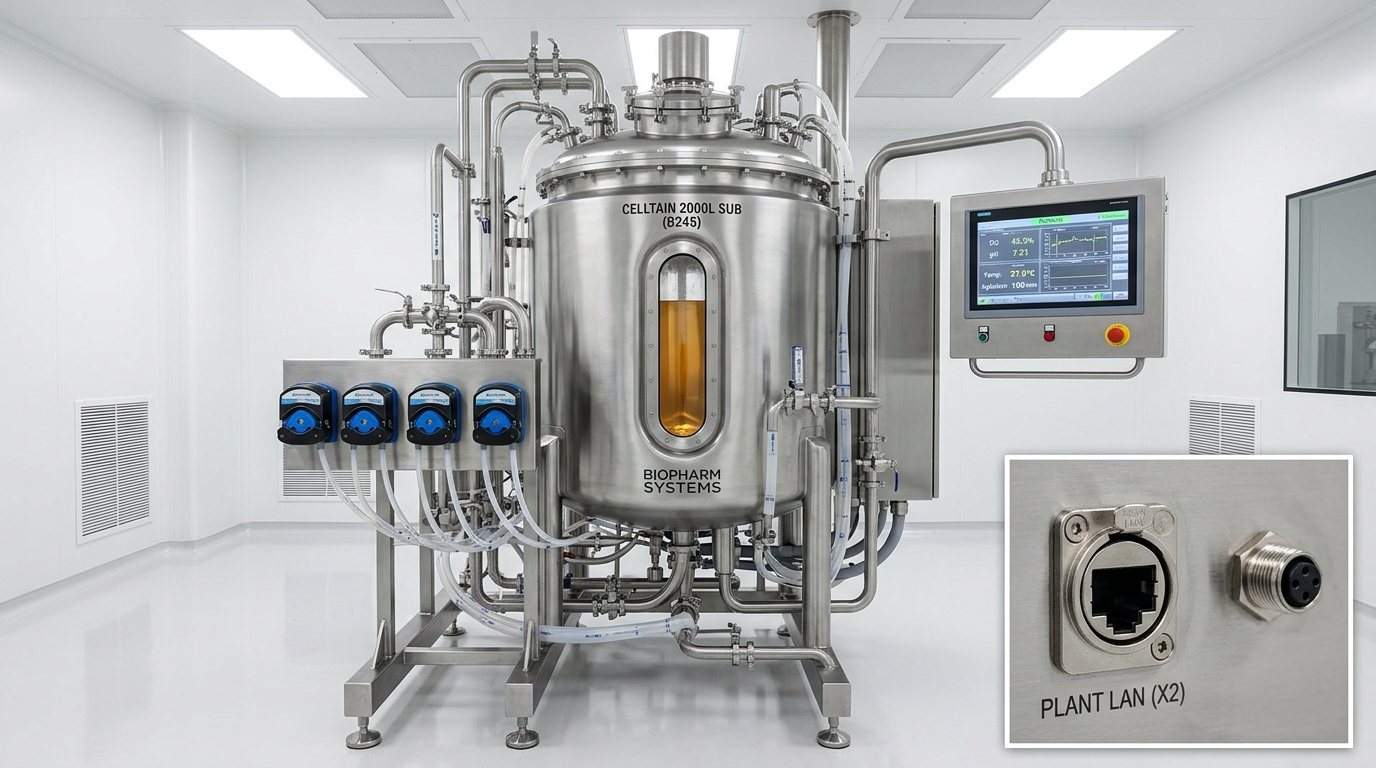
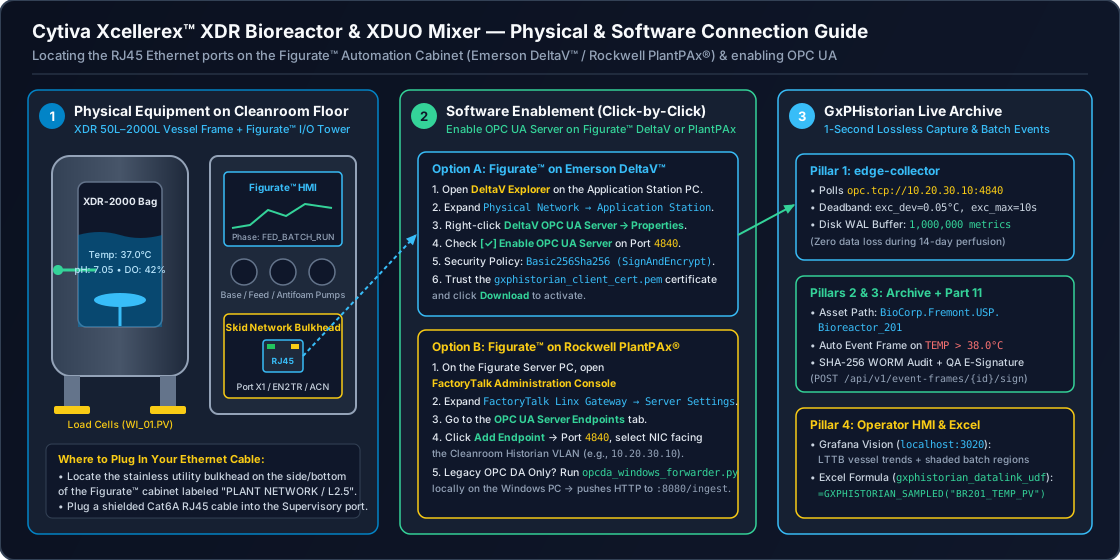
1.5 Non-Technical Step-by-Step Physical & Software Connection Walkthrough
If you are an upstream scientist, facility engineer, or commissioning specialist standing in front of an Xcellerex™ XDR Bioreactor (50 L – 2000 L) or XDUO Single-Use Mixer, follow these steps to connect it to GxPHistorian:
Step A: Physical Cable Connection (Where to Plug In)
- What You Need: One Cat6A Shielded Ethernet Cable (
S/FTP, blue or teal jacket) or an M12 D-Coded-to-RJ45 washdown Ethernet cable if your skid has sealed washdown bulkhead ports. - Locate the Figurate™ Automation Cabinet:
- Look at the stainless-steel I/O & Automation Control Cabinet mounted on the side/rear of the Xcellerex skid frame.
- Do NOT unplug any cables inside the internal Level 1 Skid I/O Ring (
192.168.1.x, which connects the internal mass flow controllers, load cells, and peristaltic pumps to the PLC). - Locate the external bulkhead port labeled
PLANT LAN/SCADA/LAN 2(connected to Port 2 (X2) of the Emerson DeltaV™ PK Controller or the Allen-Bradley 1756-EN2T Northbound Ethernet module).
- Plug In:
- Plug your Cat6A cable into the
PLANT LAN / LAN 2port on the Xcellerex skid and connect the other end to your cleanroom wall Ethernet jack (10.20.30.0/24). - Confirm the green Link LED turns solid and the amber Activity LED blinks.
- Plug your Cat6A cable into the
Step B: Software Enablement on Figurate™ (DeltaV™ or PlantPAx®)
- If Your Xcellerex Skid Runs Figurate™ on Emerson DeltaV™:
- On the DeltaV ProfessionalPlus / Application Station (or standalone DeltaV PK Controller engineering laptop), open DeltaV Explorer.
- Navigate to Physical Network Control Network [Your_XDR_PK_Controller_or_AppStation] Properties OPC UA Server.
- Check Enable OPC UA Server on the secondary northbound network interface (
10.20.30.10, Port4840). - Under Security Policies, enable
Basic256Sha256 (Sign & Encrypt), import/etc/telegraf/certs/gxphistorian_client_cert.peminto the Trusted Clients store, and click Download to apply without interrupting the active vessel control modules.
- If Your Xcellerex Skid Runs Figurate™ on Rockwell PlantPAx® (ControlLogix):
- On the FactoryTalk View SE / FactoryTalk Linx Gateway workstation, open FactoryTalk Administration Console.
- Right-click the FactoryTalk Linx Server OPC UA Server Properties.
- Enable OPC UA Endpoint (
opc.tcp://10.20.30.10:4840) and assign Read-Only access to thegxphistorian_svcaccount.
- 1-Line Network Test from Your GxPHistorian Server:
Terminal window nc -zv 10.20.30.10 4840# Expected output: Connection to 10.20.30.10 4840 port [tcp/*] succeeded!
2. End-to-End Integration Architecture
flowchart LR
  subgraph Skid["Cytiva Xcellerex™ X-Platform Skid"]
    IO["Smart Sensors & Actuators\n(Temp, pH, DO, MFCs, Load Cells, Agitator, Pumps)"]
    FIG["Figurate™ Automation Layer\n(Emerson DeltaV™ or Rockwell PlantPAx®)"]
    IO -->|"EtherNet/IP or PROFINET"| FIG
  end

  subgraph Edge["Pillar 1: Edge Collector (edge-collector)"]
    OPCUA["OPC UA Client / Worker\n(TLS + Cert Auth + ExcDev/ExcMax)"]
    OPCDA["Windows Localhost OPC DA Bridge\n(opcda_windows_forwarder.py)"]
    ING["HTTP Ingest (:8080/ingest)"]
    WAL["Telegraf Disk WAL Buffer\n(/var/lib/telegraf/buffer)"]
    OPCUA --> WAL
    OPCDA -->|"JSON Batch + Local Spool"| ING --> WAL
  end

  subgraph Core["Pillars 2–4: GxPHistorian GxP Historian"]
    CH["ClickHouse 24.8 Archive\n(pi_historian.sensor_data & 1m Rollups)"]
    PG["PostgreSQL 16 Control Plane\n(ltree ISA-95, ISA-88 Event Frames, Part 11 WORM)"]
    API["FastAPI Control Plane\n(historian-api :8020)"]
    HMI["Grafana HMI (:3020) &\nExcel PI DataLink Client"]
  end

  FIG -->|"OPC UA (Port 4840)"| OPCUA
  FIG -.->|"Legacy COM OPC DA"| OPCDA
  WAL -->|"JSONEachRow"| CH
  PG -.->|"pg_asset_tags Dictionary"| CH
  CH <--> API <--> PG
  API --> HMI
3. Protocol Connectivity Pathways (Pillar 1: Edge Collector)
Depending on your facility’s DCS/PLC topology, edge-collector supports three production ingestion pathways:
Pathway A: Native OPC UA (Primary Recommended Path for Figurate™)
Both Figurate™ for Emerson DeltaV (via DeltaV PK Controller or Application Station OPC UA Server) and Figurate™ for Rockwell PlantPAx (via FactoryTalk Linx OPC UA Gateway or ControlLogix embedded OPC UA) expose real-time process values (PV), setpoints (SP), controller outputs (OUT), alarms, and ISA-88 phase states over OPC UA.
- Stage 1 Exception/Deadband Filtering (
ExcDev&ExcMax):- Configured in
edge-collector/telegraf-clickhouse.confor via a Python OPC UA worker implementingExceptionDeadbandFilter(edge-collector/scripts/multi_protocol_simulator.py). - Suppresses high-frequency sensor noise within
exc_devwhile guaranteeing a periodic heartbeat everyexc_maxseconds and immediate emission on any OPC quality transition.
- Configured in
- OPC UA Telegraf Input Configuration Example (
edge-collector/telegraf-clickhouse.conf):[[inputs.opcua]]name = "sensor_data"endpoint = "opc.tcp://10.20.30.10:4840"connect_timeout = "10s"request_timeout = "5s"security_policy = "Basic256Sha256"security_mode = "SignAndEncrypt"certificate = "/etc/telegraf/certs/gxphistorian_client_cert.pem"private_key = "/etc/telegraf/certs/gxphistorian_client_key.pem"auth_method = "UserName"username = "${FIGURATE_OPCUA_USER}"password = "${FIGURATE_OPCUA_PASSWORD}"nodes = [{ name = "val", namespace = "2", identifier_type = "s", identifier = "Figurate.BR201.TE_01.PV", default_tags = { tag_id = "101" } },{ name = "val", namespace = "2", identifier_type = "s", identifier = "Figurate.BR201.AE_PH_01.PV", default_tags = { tag_id = "102" } },{ name = "val", namespace = "2", identifier_type = "s", identifier = "Figurate.BR201.AE_DO_01.PV", default_tags = { tag_id = "104" } },{ name = "val", namespace = "2", identifier_type = "s", identifier = "Figurate.BR201.SIC_AGIT.STATE", default_tags = { tag_id = "103" } }]
Pathway B: Legacy Windows OPC DA Forwarder (opcda_windows_forwarder.py)
For older Xcellerex installations or brownfield facilities running DeltaV OPC Mirror, RSLinx Classic, or AVEVA / Wonderware on Windows workstations exposing only COM OPC DA 2.05a:
- Run
edge-collector/scripts/opcda_windows_forwarder.pydirectly on the Windows workstation. - Connects to
localhostCOM (OpenOPC/pywin32), avoiding remote DCOM port 135/ephemeral firewall exposure. - Applies Stage 1
exc_dev/exc_maxdeadband filtering in memory (WindowsOpcDaForwarder.poll_once), buffers to a local JSONL disk spool (LocalSpoolBuffer) if the network drops, and forwards normalized JSON batches tohttp://<edge-collector>:8080/ingest.
Pathway C: Direct PLC / Fieldbus Ingestion (EtherNet/IP, PROFINET / S7)
When direct controller polling is required alongside DCS supervisory links (e.g., reading high-speed agitator drive status, mass flow controllers, or auxiliary skid interlocks), edge-collector supports pluggable [[inputs.execd]] workers and native Telegraf industrial inputs (s7comm, modbus, eip), writing into the same disk-backed Write-Ahead Log (/var/lib/telegraf/buffer, 1,000,000 metric capacity).
4. Standard Xcellerex™ X-Platform / Figurate™ Tag Mapping
The table below outlines standard Xcellerex X-Platform parameters and how their interpolation and deadband behaviors should be configured in GxPHistorian GxP Historian:
| Tag ID | Tag Name | Figurate™ Parameter Description | Eng Units | is_step_tag (Interpolation) | exc_dev (Deadband) | Typical USP Limits (Low / High) | Protocol |
|---|---|---|---|---|---|---|---|
101 | BR201_TEMP_PV | Dual-probe vessel temperature (TE_01.PV) | degC | false (LINEAR) | 0.05 | 35.0 / 38.0 | OPC_UA |
102 | BR201_PH_PV | Primary single-use/glass pH sensor (AE_PH_01.PV) | pH | false (LINEAR) | 0.02 | 6.80 / 7.40 | OPC_UA |
103 | BR201_AGIT_STATE | Bottom-mount magnetic agitator state (0=OFF, 1=LOW, 2=HIGH_RUN) | state | true (LOCF Step) | 0.00 | 0.0 / 2.0 | OPC_UA / S7COMM |
104 | BR201_DO_PV | Optical Dissolved Oxygen primary sensor (AE_DO_01.PV) | %Sat | false (LINEAR) | 0.10 | 20.0 / 100.0 | OPC_UA |
105 | BR201_AGIT_RPM_PV | Magnetic impeller agitation speed (SI_AGIT.PV) | RPM | false (LINEAR) | 0.50 | 10.0 / 250.0 | OPC_UA |
106 | BR201_SPARGE_O2_PV | Sparger Mass Flow Controller (FIC_O2.PV) | SLPM | false (LINEAR) | 0.05 | 0.0 / 50.0 | OPC_UA |
107 | BR201_SPARGE_CO2_PV | Sparger Mass Flow Controller (FIC_CO2.PV) | SLPM | false (LINEAR) | 0.02 | 0.0 / 20.0 | OPC_UA |
108 | BR201_VESSEL_WT_PV | Bioreactor load cell vessel weight (WI_01.PV) | kg | false (LINEAR) | 0.20 | 50.0 / 2100.0 | OPC_UA |
109 | BR201_PHASE_STATE | ISA-88 Figurate™ unit procedure phase state | phase | true (LOCF Step) | 0.00 | NULL / NULL | OPC_UA |
Why
is_step_tagMatters for GMP Compliance: Continuous analog parameters (is_step_tag = false) use linear time-weighted interpolation (WITH FILL STEP ... INTERPOLATE) in PI DataLink queries, whereas discrete equipment states (is_step_tag = true, such as agitator state or ISA-88 batch phase) enforce Last Observation Carried Forward (LOCF) so impossible fractional states (e.g.,1.5) are never synthesized.
5. Step-by-Step Provisioning & Operation
Step 1: Register the Xcellerex Asset in the ISA-95 Hierarchy
In PostgreSQL (init-postgres/01_control_plane_part11.sql), each Xcellerex unit is registered in the assets table with an ltree path (Enterprise.Site.Area.Unit):
BEGIN;SET LOCAL app.actor_id = 'operator_01';SET LOCAL app.change_reason = 'Register Xcellerex X-Platform 2000L Bioreactor 201';
INSERT INTO assets (asset_id, asset_name, asset_path, template_id, metadata) VALUES  (1, 'Bioreactor_201', 'BioCorp.Fremont.USP.Bioreactor_201', 1,   '{"vessel_volume_L": 2000, "model": "Cytiva Xcellerex X-Platform 2000L", "automation": "Figurate DeltaV", "gmp_classification": "Grade_C", "equipment_id": "EQ-BR-201"}'::jsonb)ON CONFLICT (asset_id) DO NOTHING;
COMMIT;
Step 2: Provision Figurate™ Tags via the 21 CFR Part 11 Control Plane API
Use POST /api/v1/tags with mandatory X-Actor-Id and X-Change-Reason headers (§11.10(e) attribution). Any unattributed write is blocked by fn_enforce_part11_audit().
curl -s -X POST http://localhost:8020/api/v1/tags \ -H "Content-Type: application/json" \ -H "X-Actor-Id: operator_01" \ -H "X-Change-Reason: Provision Xcellerex X-Platform Optical DO sensor via Figurate OPC UA" \ -d '{ "tag_id": 104, "tag_name": "BR201_DO_PV", "asset_id": 1, "attribute_name": "Dissolved_Oxygen_PV", "eng_units": "%Sat", "is_step_tag": false, "exc_dev": 0.1, "low_limit": 20.0, "high_limit": 100.0, "source_protocol": "OPC_UA", "source_config": { "endpoint": "opc.tcp://10.20.30.10:4840", "node_id": "ns=2;s=Figurate.BR201.AE_DO_01.PV", "sampling_ms": 1000 } }' | jq .Within 5–15 seconds, ClickHouse automatically refreshes its in-memory FLAT dictionary (pi_historian.pg_asset_tags reading v_clickhouse_tag_dict), making the new tag immediately available for hierarchy-enriched analytics and Parquet exports.
Step 3: Verify OPC Signal Quality Handling & Lossless Archiving
- Raw Diagnostic Archive (
pi_historian.sensor_data): Preserves every emitted sample across all OPC quality codes (192= Good,64= Uncertain,0= Bad) usingDoubleDelta + ZSTD(1)on timestamps andGorilla + ZSTD(1)on floating-point values. If a single-use pH or DO sensor cable is disconnected (quality = 0), the fault event is preserved for maintenance diagnostics. - Good-Quality GMP Calculations (
WHERE quality >= 192): The real-time 1-minute rollup materialized view (pi_historian.mv_sensor_rollup_1m), LTTB visual trends (/api/v1/trends/plot-values), DataLink queries (/api/v1/datalink/sampled), and Event Frame KPIs strictly filterWHERE quality >= 192so sensor faults never corrupt batch averages or excursion metrics.
Step 4: Automated ISA-88 Batch Event Frames & 21 CFR Part 11 Electronic Signatures
- Batch & Excursion Detection: Calling
POST /api/v1/event-frames/evaluate(or running the background evaluation loop inapp/main.py) automatically opens/updates the parentFermentation_BatchEvent Frame onBioreactor_201and detects parameter excursions (such asBR201_TEMP_PV > 38.0 °C), capturing summary metrics (peak_val,avg_val,min_val,sample_count,duration_sec). - Operator HMI Visualization: Open
http://localhost:3020/d/gxphistorian-gxp-bioreactor-hmiin Grafana to view high-speed LTTB vessel trends (largestTriangleThreeBuckets), 1-minute rollup envelopes, shaded Event Frame excursion overlays, and the live 21 CFR Part 11 WORM audit trail. - QA Disposition & Electronic Signature (
§11.50,§11.70,§11.200):This verifies the user’s password againstTerminal window curl -s -X POST "http://localhost:8020/api/v1/event-frames/<EVENT_UUID>/sign" \-H "Content-Type: application/json" \-H "X-Actor-Id: qa_approver_01" \-H "X-Change-Reason: QA disposition of Xcellerex Bioreactor 201 thermal excursion" \-d '{"user_id": "qa_approver_01","password": "QA_Approver_2026!","signature_meaning": "Excursion Investigation Reviewed","change_reason": "QA disposition of Xcellerex Bioreactor 201 thermal excursion"}' | jq .pgcryptobcrypt hashes in PostgreSQL, binds a non-repudiableHMAC-SHA256signature to the Event Frame, and appends a tamper-evident entry to the SHA-256 hash chain inpart11_audit_log.