
GMP Stability Chambers, $\text{CO}_2$ Incubators, $-80\,^\circ\text{C}$ Cold Chain & Steam Autoclaves Integration Guide
Document ID: SOP-STABILITY-COLDCHAIN-GXPHISTORIAN-2026
Target Systems: Binder KBF / Weiss Technik / Caron ICH Q1A Stability Chambers, Infors HT Multitron / Thermo Scientific™ Heracell™ Incubators, PHCbi / Thermo TSX Ultra-Low Temperature (ULT) Freezers, Vaisala / Monnit Independent PT100 Probes, and Fedegari / Getinge / Belimed GMP Steam Sterilizers (Autoclaves)
Target Platform: GxPHistorian (edge-collector, postgres-control, clickhouse-archive, grafana-vision)
Regulatory Alignment: ICH Q1A(R2) Stability Testing, USP <1079> Good Storage & Distribution Practices, USP <1229> Steam Sterilization ( Lethality), EN 285, 21 CFR Part 11, EU GMP Annex 11
1. Visual Equipment & Physical Connection Overview
Every QC stability lab, cell bank cryostorage room, seed train suite, and sterile equipment prep area relies on continuous thermal, humidity, gas, and sterilization monitoring. Historically, facilities maintained separate “island” monitoring software for stability chambers (e.g., Binder APT-COM), freezer monitoring (e.g., Vaisala viewLinc / Rees), and autoclave paper printout strips—creating massive manual data transcription burdens during FDA inspections.
GxPHistorian unifies all four equipment families into a single 21 CFR Part 11 historian while automatically computing ICH Q1A Mean Kinetic Temperature () and USP <1229> Steam Sterilization Lethality () directly in ClickHouse SQL.
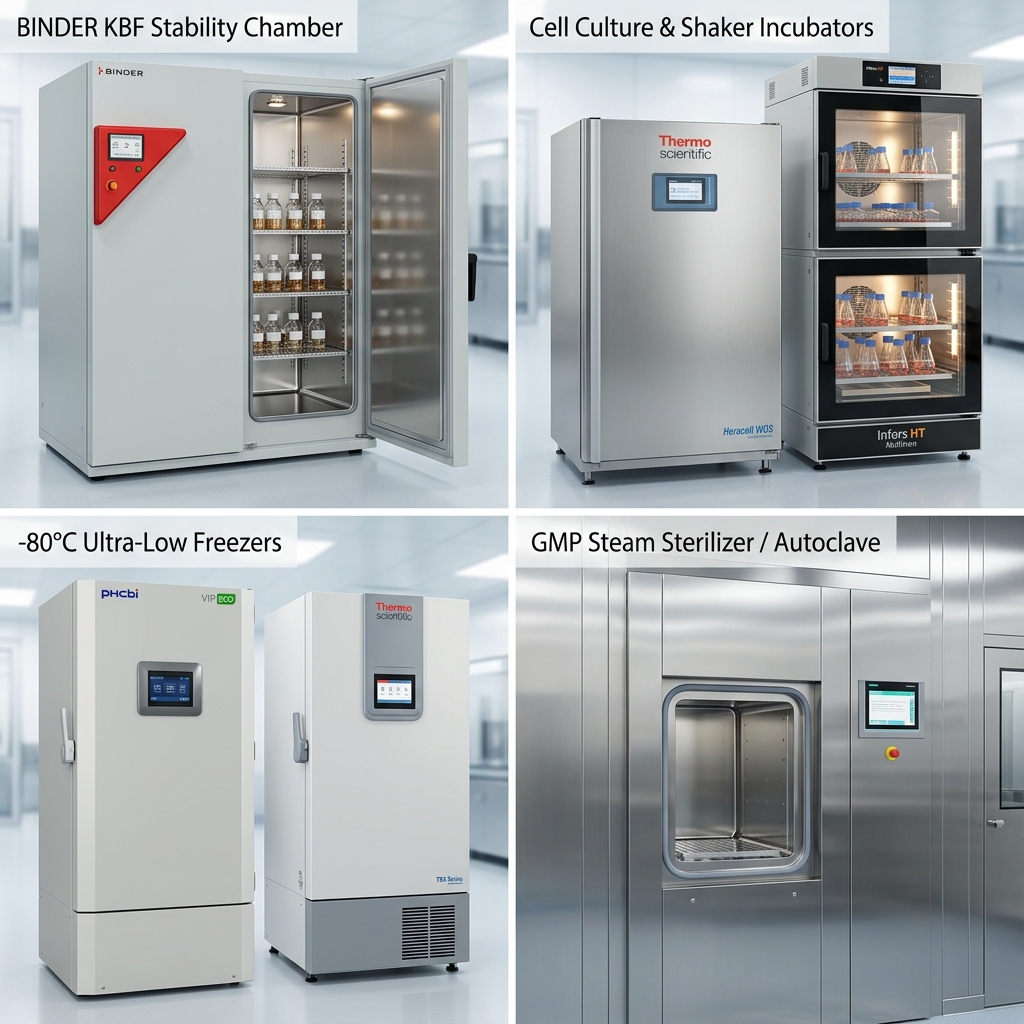
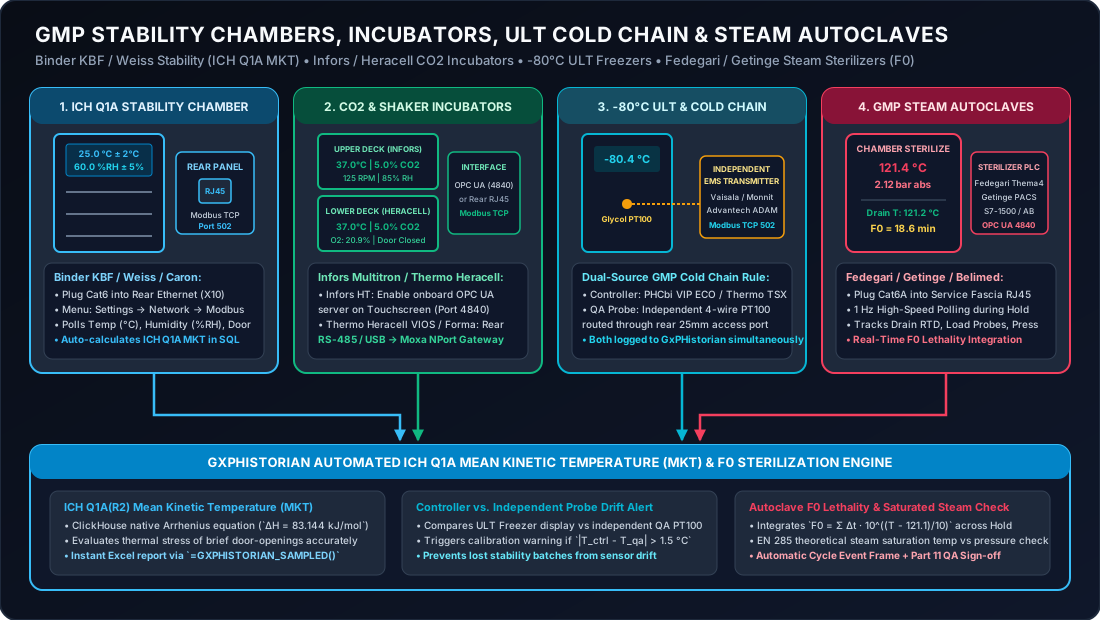
Also refer to our universal connector diagram if you are unfamiliar with industrial ports:
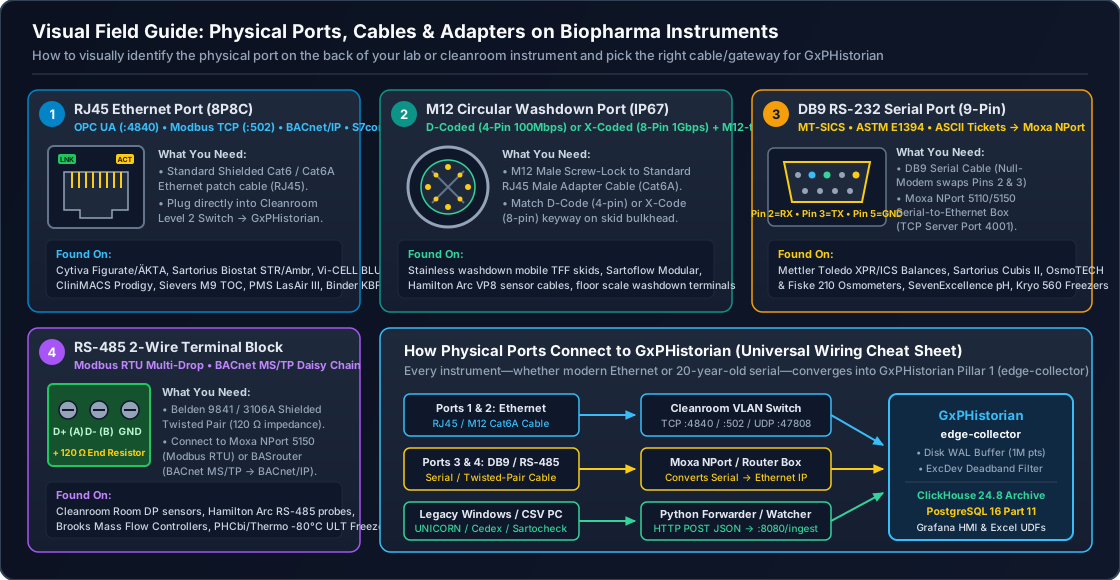
2. Quick-Reference: Physical & Software Connection Matrix
| Equipment Family | Representative Models (Official Vendor Links) | Where to Plug In on the Physical Unit | Cable / Gateway Hardware | Software Protocol & Port | Key Regulatory Calculation |
|---|---|---|---|---|---|
| ICH Q1A Constant Climate Stability Chambers | BINDER KBF / KBF-PRO, Weiss Technik PharmaEvent, Caron 7000, Memmert HPP | Rear Communications Panel (X10): Standard RJ45 Ethernet port (or 9-pin RS-485 on pre-2016 units) | Standard Cat6 Ethernet Cable into Lab Switch (or Moxa MGate MB3180 for older RS-485 units) | Modbus TCP (Port 502) or OPC UA (Port 4840 on Weiss Simpati / Binder MB2) | ICH Q1A(R2) Mean Kinetic Temperature () with |
| GMP Shaker & Incubators | Infors HT Multitron Pro, Thermo Heracell™ VIOS 160i/250i, Eppendorf CellXpert, Kuhner ISF1-Z | Rear Panel Upper/Lower Bay: RJ45 Ethernet (Infors/CellXpert) or RS-485 / USB-B / RJ11 (Heracell) | Cat6 Ethernet Cable or Moxa NPort 5150 serial converter | OPC UA (Port 4840, Infors eve®/Touchscreen) or Modbus TCP / ASCII Serial | Continuous , , , Shaker & Door-Open duration |
| ULT Freezers, Freezers & Refrigerators | PHCbi (Panasonic) VIP® ECO, Thermo Scientific™ TSX Series, Haier Biomedical, Liebherr | Dual Connection: (1) Rear 25 mm Access Port for independent QA PT100 probe + (2) Rear RJ45 / RS-485 / Dry Contact | Advantech ADAM-6015 / 6017 (PT100 RTD / 4–20mA to Modbus TCP) + Cat6 | Modbus TCP (Port 502) or OPC UA | USP <1079> Dual-Verification: Independent QA Probe vs. Freezer Controller Drift Alert |
| GMP Steam Sterilizers (Autoclaves) | Fedegari Thema4, Getinge PACS / 88-Series, Belimed MST-V, STERIS Finn-Aqua | Technical Service Side Fascia: RJ45 Ethernet on Siemens S7-1500 (X2) or Allen-Bradley CompactLogix | Standard Cat6A Shielded Cable | OPC UA (Port 4840) or S7comm (Port 102) at (1s) polling | USP <1229> Cumulative Lethality + EN 285 Steam Saturation Check |
3. Tutorial 1: Binder KBF / Weiss Technik ICH Q1A Stability Chambers (+ Automated MKT SQL)
ICH Q1A(R2) requires continuous monitoring of long-term (), intermediate (), and accelerated () stability chambers, plus calculation of Mean Kinetic Temperature () whenever a thermal excursion or door opening occurs.
3.1 Physical Connection Step-by-Step (Non-Technical Walkthrough)
- Locate the Rear Ethernet Port:
- Look at the back of your Binder KBF (with the triangle
MB2orMB3controller) or Weiss Technik PharmaEvent chamber. - Near the upper-right wiring box, locate the RJ45 Ethernet socket labeled
Ethernet / LAN (X10).
- Look at the back of your Binder KBF (with the triangle
- Plug In:
- Plug a standard Cat6 Ethernet cable into the chamber’s rear RJ45 port and connect the other end to your QC Lab Ethernet switch (
10.20.80.0/24). - (If you have an older Binder KBF with a round DIN or screw-terminal RS-485 port): Connect the
D+andD-wires to a Moxa MGate MB3180 RS-485-to-Modbus-TCP gateway ($160).
- Plug a standard Cat6 Ethernet cable into the chamber’s rear RJ45 port and connect the other end to your QC Lab Ethernet switch (
3.2 Software Enablement on the Stability Chamber Controller
- On the Binder front controller screen, press the Menu / Home button.
- Navigate to Settings Network / Ethernet.
- Set IP Mode =
Manual (Static):- IP Address:
10.20.80.11 - Subnet Mask:
255.255.255.0 - Gateway:
10.20.80.1
- IP Address:
- Navigate to Settings Modbus / Remote Access:
- Set Modbus TCP Server:
Enabled(Port 502, Unit ID1). - Set Write Access:
Disabled (Read-Only)(Critical GMP safeguard: ensures no external network device can accidentally overwrite the chamber’s setpoints!).
- Set Modbus TCP Server:
3.3 Telegraf Modbus TCP Configuration (edge-collector/telegraf.conf)
[[inputs.modbus]]  name = "binder_kbf_stab_chamber_01"  controller = "tcp://10.20.80.11:502"  slave_id = 1  timeout = "3s"  interval = "10s"  configuration_type = "register"
  holding_registers = [    { name = "STAB01_TEMP_PV_C",     byte_order = "ABCD", data_type = "FLOAT32-IEEE", scale = 1.0, address = [4113, 4114] },    { name = "STAB01_TEMP_SP_C",     byte_order = "ABCD", data_type = "FLOAT32-IEEE", scale = 1.0, address = [4119, 4120] },    { name = "STAB01_HUMIDITY_PV_RH",byte_order = "ABCD", data_type = "FLOAT32-IEEE", scale = 1.0, address = [4241, 4242] },    { name = "STAB01_HUMIDITY_SP_RH",byte_order = "ABCD", data_type = "FLOAT32-IEEE", scale = 1.0, address = [4247, 4248] },    { name = "STAB01_DOOR_OPEN_FLAG",byte_order = "AB",   data_type = "UINT16",       scale = 1.0, address = [4360] }  ]
3.4 Automatic ICH Q1A(R2) Mean Kinetic Temperature () in ClickHouse SQL
Mean Kinetic Temperature () represents the single calculated isothermal temperature that simulates the non-isothermal degradation effects of temperature variations over a stability period:
Where:
- (standard ICH Q1A activation energy for pharmaceutical degradation)
- (universal gas constant, so )
- (temperature sample in Kelvin, filtered strictly to
quality >= 192)
You can run this exact query in Grafana or ClickHouse at any time to generate an audit-ready ICH Q1A MKT report:
SELECT tag_id, count() AS good_samples, round(min(val), 2) AS min_temp_c, round(max(val), 2) AS max_temp_c, round(avg(val), 2) AS arithmetic_mean_c, round( (10000.0 / (-ln(avg(exp(-10000.0 / (val + 273.15)))))) - 273.15, 2 ) AS ich_q1a_mkt_cFROM gxphistorian.raw_telemetryWHERE tag_id = (SELECT tag_id FROM gxphistorian.pg_tags_dict WHERE tag_name = 'STAB01_TEMP_PV_C') AND quality >= 192 AND ts >= now() - INTERVAL 30 DAYGROUP BY tag_id;4. Tutorial 2: Infors HT Multitron & Thermo Heracell™ Incubators
Seed train flasks and cell therapy expansion bags depend on incubators maintaining and .
4.1 Physical & Software Setup
- Infors HT Multitron Pro / Standard:
- Plug a Cat6 Ethernet cable into the RJ45 port on the back of the Multitron base unit.
- On the Multitron touchscreen, tap Settings Connectivity OPC UA and enable the onboard OPC UA Server (
Port 4840). - Poll
TEMP_PV,CO2_PV,HUMIDITY_PV, andSHAKER_RPM_PVevery5s.
- Thermo Scientific™ Heracell™ VIOS 160i / 250i:
- Look at the rear communications plate of the Heracell VIOS incubator. Locate the USB-B or RS-485 serial output port (adjacent to the
4–20 mA/ dry-contact alarm plug). - Connect via a Moxa NPort 5150 serial-to-Ethernet adapter (
9600, 8, N, 1) and useserial_rs232_collector.pyto capture the incubator’s periodic telemetry line (T=37.0, CO2=5.0, O2=20.9, RH=93.0, DOOR=0).
- Look at the rear communications plate of the Heracell VIOS incubator. Locate the USB-B or RS-485 serial output port (adjacent to the
5. Tutorial 3: ULT Freezers & Independent QA PT100 Probes (USP <1079>)
5.1 Why GMP Auditors Require TWO Independent Sensors on Every Freezer
Under USP <1079> and EU GMP Annex 11, you should never rely solely on a freezer’s own internal controller sensor for quality release, because if that sensor drifts by , the freezer both cools improperly and reports a false reading.
- Best Practice with GxPHistorian: Log both the Independent QA Calibration Probe (
ULT01_QA_PT100_C) AND the Freezer’s Built-in Controller Telemetry (ULT01_CTRL_TEMP_C) intoGxPHistorian.
5.2 Physical Wiring Step-by-Step (Non-Technical Walkthrough)
- Install the Independent QA PT100 RTD Probe:
- Locate the 25 mm circular silicone stopper (access port) on the back or side wall of your PHCbi VIP ECO or Thermo TSX freezer.
- Thread a calibrated 4-wire Class A PT100 RTD probe (submerged in a small cryovial of propylene glycol / thermal buffer) through the port, place it near the center shelf, and reseal the port with cryo-putty/foam plug.
- Wire the 4 PT100 leads (
RTD+,Sense+,RTD-,Sense-) into Channel 0 of an Advantech ADAM-6015 (7-Channel RTD-to-Modbus-TCP Ethernet module,~$240, DIN-rail mounted on the wall behind the freezer bank) or a Vaisala viewLinc RFL100 / VaiNet gateway.
- Connect the Freezer’s Built-In Controller Port:
- On Thermo TSX Series: Plug a Cat6 cable into the rear Ethernet/Wi-Fi module (or USB/Serial port).
- On PHCbi VIP ECO: Connect the rear RS-485 port (
MTR-480Cinterface card) to your Moxa gateway.
- Automatic Sensor Drift Alert:
GxPHistoriancomparesabs(ULT01_QA_PT100_C - ULT01_CTRL_TEMP_C)every minute. If the two probes diverge by more than , Grafana alerts Facilities before a compressor failure or calibration failure occurs!
6. Tutorial 4: GMP Steam Sterilizers / Autoclaves (Fedegari, Getinge, Belimed) + Lethality
Steam sterilization of bioreactor harvest assemblies, stopper bowls, and fill-line manifolds is a Direct-Impact Critical Process.
6.1 Physical Connection Step-by-Step
- Open the Technical Service Access Panel on the non-sterile side of the Fedegari Thema4, Getinge PACS, or Belimed MST-V autoclave.
- Locate the PLC cabinet containing the Siemens S7-1500 or Allen-Bradley CompactLogix processor.
- Plug a Cat6A Shielded Ethernet cable into the PLC’s Customer Historian / SCADA port (
X2) and connect to your GMP Automation VLAN (10.20.90.15). - Configure
edge-collector/telegraf.confto poll the autoclave OPC UA server (opc.tcp://10.20.90.15:4840) atinterval = "1s"(1 Hz):AUTO01_DRAIN_TEMP_C(Chamber Drain RTD — the cold-spot regulatory reference probe)AUTO01_LOAD_PROBE1_C(Flexible PT100 inserted inside the slowest-heating load item)AUTO01_CHAMBER_PRESS_MBAR(Absolute Chamber Pressure in / )AUTO01_CYCLE_PHASE_CODE(0=Idle,1=Vacuum Pulses,2=Heating,3=Sterilization Hold,4=Drying,5=Complete)
6.2 Real-Time USP <1229> Lethality Calculation in ClickHouse SQL
The cumulative thermal lethality (equivalent minutes at with ) is integrated across all 1s samples where temperature exceeds :
Run this ClickHouse SQL query (or bind it to your Grafana Autoclave Cycle Release panel) to verify that every autoclave cycle achieved and maintained minimum sterilization hold temperature :
SELECT ef.batch_id AS cycle_id, minIf(r.val, r.val >= 121.0) AS min_hold_temp_c, max(r.val) AS max_hold_temp_c, countIf(r.val >= 121.1) AS seconds_above_121_1c, round( sumIf((1.0 / 60.0) * pow(10.0, (r.val - 121.11) / 10.0), r.val >= 100.0), 2 ) AS cumulative_f0_minutesFROM gxphistorian.raw_telemetry AS rINNER JOIN gxphistorian.pg_event_frames AS ef ON r.ts >= ef.start_time AND r.ts <= coalesce(ef.end_time, now())WHERE r.tag_id = (SELECT tag_id FROM gxphistorian.pg_tags_dict WHERE tag_name = 'AUTO01_DRAIN_TEMP_C') AND r.quality >= 192 AND ef.batch_id = 'AUTOCLAVE-CYCLE-2026-1042'GROUP BY ef.batch_id;7. Non-Technical Troubleshooting Checklist
| Symptom Seen by User | Most Likely Cause | Quick Fix |
|---|---|---|
Binder KBF chamber responds to ping, but Port 502 refuses connection | Modbus TCP Server toggle is still set to Off in the Binder triangle controller menu. | On the Binder screen, open Settings Network Modbus and switch Server = Enabled. |
Advantech ADAM-6015 on freezer reads (quality = 0) | One of the 4 PT100 sense wires (Sense+ or Sense-) is loose in the green spring terminal block. | Tighten all 4 screw terminals on the ADAM-6015 input block; verify 3-wire vs 4-wire jumper setting in the ADAM web page. |
| Autoclave calculation is 5x lower than the autoclave paper printout | Telegraf is polling the autoclave every 5s while the SQL query assumes 1.0 / 60.0 ( intervals). | Either set interval = "1s" in telegraf.conf (recommended for sterilization holds) or use dateDiff('second', lagInFrame(ts), ts) / 60.0 in SQL. |